Frequently Asked Questions
DoggedIt Live
A live streaming app built by a pool player (Sajal Ghimire) and his cousin (Saksham Ghimire)… because pool deserved better tools.
Watch Tutorial
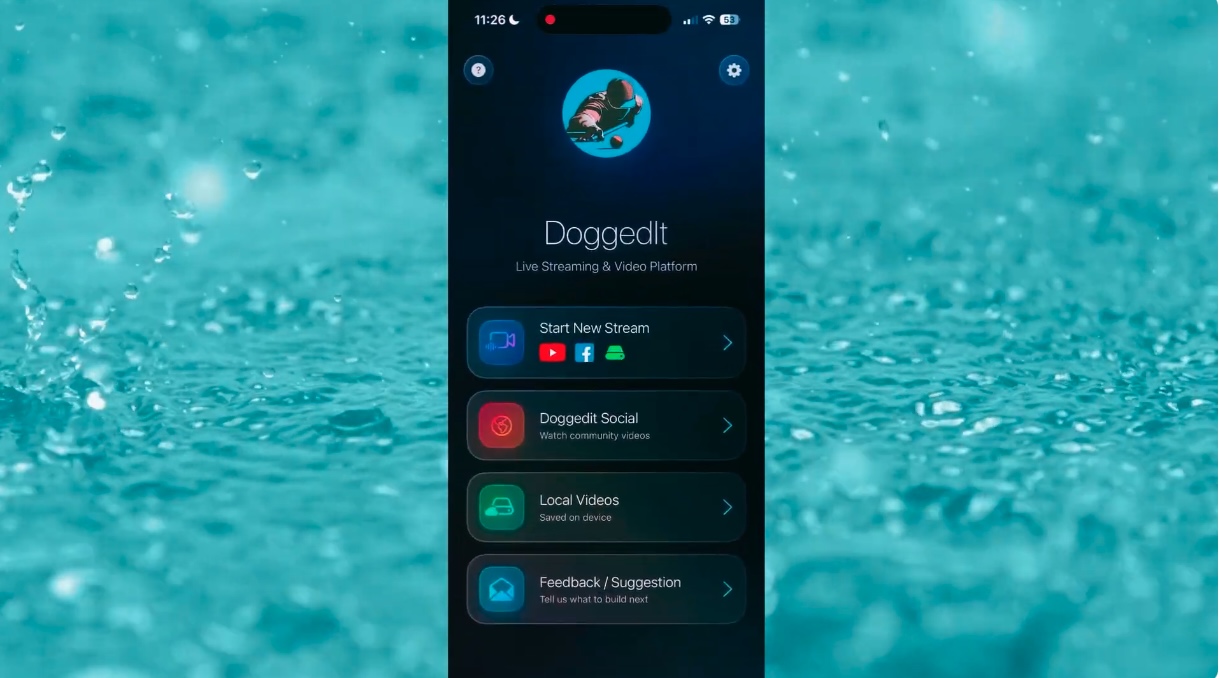
Tap to watch on YouTube
What is DoggedIt Live?
DoggedIt Live is a simple, polished live streaming app made by a pool player and his cousin who thought:
"Why don't pool players have an easy, professional streaming setup on their phone?"
So we built one.
DoggedIt Live helps you stream your matches with:
"Why don't pool players have an easy, professional streaming setup on their phone?"
So we built one.
DoggedIt Live helps you stream your matches with:
- Clean scoreboards
- Player names
- Professional overlays
- Remote scoring
- Local recording
- YouTube & Facebook streaming
- Easy sharing
Do I need a tripod to stream?
For best results, we highly recommend using a tripod.
Any tripod that securely holds your phone will work, as long as it keeps the camera stable and pointed at the table.
A stable setup helps with:
https://amzn.to/49cKpWt
But feel free to use any tripod that works best for your space.
Any tripod that securely holds your phone will work, as long as it keeps the camera stable and pointed at the table.
A stable setup helps with:
- Clearer video
- Better framing
- More professional-looking streams
- Smoother AI overlays
https://amzn.to/49cKpWt
But feel free to use any tripod that works best for your space.
Do I need additional Facebook setup after signing in?
Yes — one time only.
Facebook defaults livestream visibility to "Only Me" for new integrations.
If you want your stream to be public, you must:
1. Go to Facebook → Settings & Privacy
2. Business Integrations
3. Find DoggedIt Live
4. Change visibility from Only Me → Public
We've created a short step-by-step video showing exactly how to do this:
https://youtube.com/shorts/eXdecF5wJXE
Done once → works forever (unless permissions are removed).
Facebook defaults livestream visibility to "Only Me" for new integrations.
If you want your stream to be public, you must:
1. Go to Facebook → Settings & Privacy
2. Business Integrations
3. Find DoggedIt Live
4. Change visibility from Only Me → Public
We've created a short step-by-step video showing exactly how to do this:
https://youtube.com/shorts/eXdecF5wJXE
Done once → works forever (unless permissions are removed).
Anything special needed for YouTube Live?
Yes — your YouTube account must be enabled for livestreaming.
If it's your first time:
If it's your first time:
- YouTube may take up to 24 hours to activate livestreaming
- After activation, DoggedIt Live can automatically create broadcasts for you
- Once approved, you're good to go.
What upload speed do I need?
We recommend:
If you have strong WiFi:
- 5 Mbps upload
If you have strong WiFi:
- Switch to Better Quality in settings for sharper video.
- Switch to Low Quality Mode for a smoother stream.
My stream is getting disconnected after a few minutes of going live. What can I do?
This can happen due to network restrictions — especially on business or public Wi-Fi.
Some routers (common in pool halls, bars, offices, and venues) aggressively block or reset long-lived streaming connections, even though the stream may appear healthy at first.
What you can try:
Proton VPN (App Store):
https://apps.apple.com/us/app/proton-vpn-fast-secure/id1437005085
Some routers (common in pool halls, bars, offices, and venues) aggressively block or reset long-lived streaming connections, even though the stream may appear healthy at first.
What you can try:
- Switch to a different Wi-Fi network if available
- Use a VPN to bypass restrictive network rules
Proton VPN (App Store):
https://apps.apple.com/us/app/proton-vpn-fast-secure/id1437005085
How do I know if my stream is healthy?
Once your stream starts, we continuously check its health in the background.
You can see the stream health using the small circular indicator on the top info bar:
If this happens, try switching networks, lowering quality, or using a VPN.
You can see the stream health using the small circular indicator on the top info bar:
- Green → Stream is healthy and performing well
- Yellow → Stream is okay, but may have minor issues
- Red → Stream health is poor or has errors
If this happens, try switching networks, lowering quality, or using a VPN.
Can I record on-device only (no livestream)?
Absolutely!
Device-Only Mode lets you:
Device-Only Mode lets you:
- Record your entire match locally
- Avoid internet issues entirely
- Upload anywhere later
What scoring options do I get?
DoggedIt Live supports multiple scoring methods:
Game Controller
Game Controller
- Use a wireless controller like 8BitDo. Fastest way to update scores.
- Tap + / – buttons in the app.
- Share a link so a friend, tournament director, or scorekeeper can update the score from their own device.
- Your stream updates instantly.
How does scoring with a Game Controller work?
DoggedIt Live supports wireless game controllers for fast, hands-free scoring.
You can use almost any Bluetooth game controller and pair it directly with your phone.
We tested this using an 8BitDo wireless controller.
You can purchase one here:
https://amzn.to/4qso4eE
To connect:
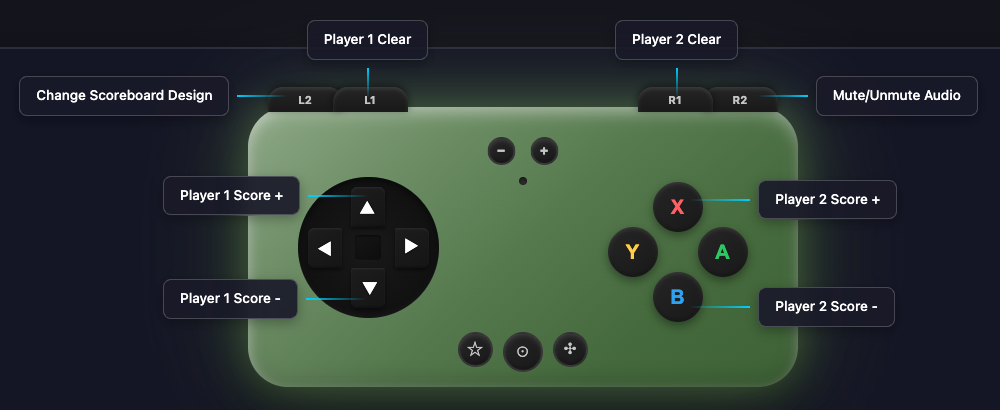
You can use almost any Bluetooth game controller and pair it directly with your phone.
We tested this using an 8BitDo wireless controller.
You can purchase one here:
https://amzn.to/4qso4eE
To connect:
- Turn on the controller in "Switch" mode
- Pair it via Bluetooth on your phone
- Update Player 1 and Player 2 scores
- Clear scores
- Change scoreboard designs
- Mute or unmute stream audio
- Control other live actions without touching your phone
What scoreboard designs are available?
We offer several clean, modern scoreboard styles with preset color themes.
No complicated setup — just pick a design and your stream instantly looks professional.
And we're constantly exploring new designs, so feedback is always welcome — good or bad!
No complicated setup — just pick a design and your stream instantly looks professional.
And we're constantly exploring new designs, so feedback is always welcome — good or bad!
Does DoggedIt Live support AI features?
Yes!
AI Visual Commentary (optional) helps with:
AI Visual Commentary (optional) helps with:
- Smart visuals
- Cool animations
- Ball overlays
- Future advanced AI features
Can I add my own logo or sponsor logos?
Absolutely.
You can show:
You can show:
- Your personal logo
- Team logo
- Tournament sponsors
Is DoggedIt Live free?
Right now — yes, completely free.
As we keep adding new features (AI, servers, more scoreboards, analytics), there may be optional paid upgrades down the road so we can cover costs.
But the goal is always to keep core livestreaming accessible and fair.
Remember — it's just two cousins trying to make pool streaming better.
As we keep adding new features (AI, servers, more scoreboards, analytics), there may be optional paid upgrades down the road so we can cover costs.
But the goal is always to keep core livestreaming accessible and fair.
Remember — it's just two cousins trying to make pool streaming better.
Do I need camera/mic permissions?
Yes — the app needs:
- Camera to show the table
- Microphone to capture match audio
Can I stream on cellular data?
Yes!
Just check:
Just check:
- Upload speed ≥ 5 Mbps for default quality
- Switch to Low Quality from settings if signal is weaker.
How do I get my livestream link to share?
As soon as you go live:
- DoggedIt Live automatically fetches your watch link
- Tap the Share button
- Send it anywhere (Messenger, SMS, WhatsApp, etc.)